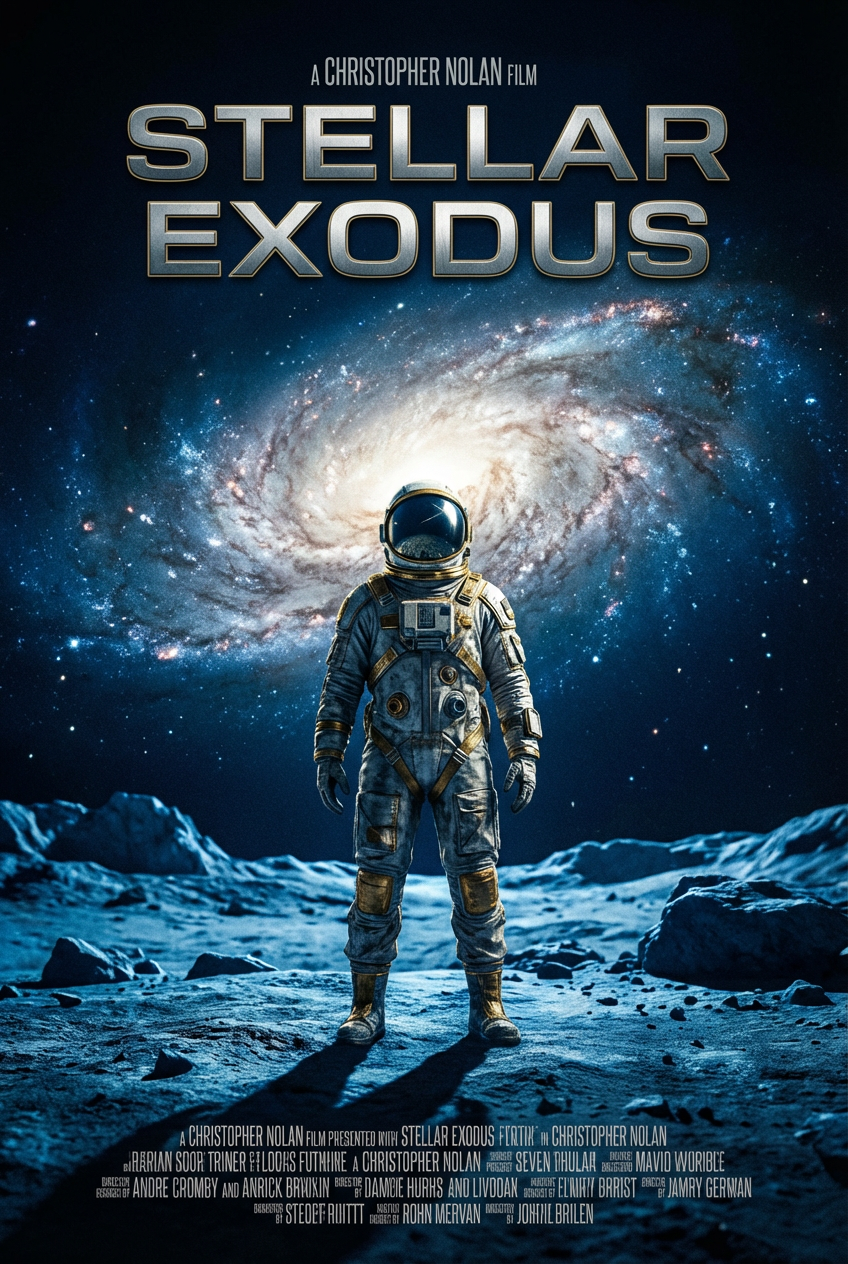
<!DOCTYPE html>
<html lang="zh-CN">
<head>
<meta charset="UTF-8">
<meta name="viewport" content="width=device-width, initial-scale=1.0">
<title>代码展示容器(浅色版)</title>
<style>
* {
margin: 0;
padding: 0;
box-sizing: border-box;
}
body {
background-color: #ffffff; /* 页面背景改为白色,适配浅色容器 */
padding: 2rem;
}
/* 代码容器样式 - 浅色改版 */
.code-container {
position: relative;
background-color: #f8fafc; /* 浅灰背景,浅色核心 */
border: 1px solid #e2e8f0; /* 浅边框提升质感 */
border-radius: 6px;
padding: 1.2rem;
max-width: 900px;
margin: 0 auto;
box-shadow: 0 1px 3px rgba(0,0,0,0.05); /* 轻微阴影,增加层次感 */
}
/* 头部区域(标题+复制按钮) */
.header {
display: flex;
justify-content: space-between;
align-items: center;
margin-bottom: 1rem;
}
.title {
font-size: 1.1rem;
color: #1e293b; /* 深色标题,保证可读性 */
font-weight: 500;
/* 无需额外添加 text-align: left; 原布局默认居左,添加后可进一步强化,效果一致 */
/* text-align: left; */
}
.copy-btn {
background: transparent;
border: none;
color: #2563eb; /* 深蓝色文字,适配浅色风格且醒目 */
cursor: pointer;
font-size: 1rem;
padding: 0.4rem 0.6rem;
transition: color 0.2s ease;
}
.copy-btn:hover {
color: #3b82f6; /* 浅一点的蓝色,hover交互效果 */
}
/* 代码块样式 - 浅色适配 */
.code-block {
color: #1f2937; /* 深灰文字,保证代码可读性 */
font-family: 'Consolas', 'Monaco', monospace; /* 等宽字体 */
white-space: pre-wrap; /* 保留换行和空格 */
line-height: 1.6;
overflow-x: auto; /* 超出部分滚动 */
}
</style>
</head>
<body>
<div class="code-container">
<div class="header">
<!-- 核心修改:标题文字改为「中文提示词」,默认居左 -->
<span class="title">中文提示词</span>
<button class="copy-btn">复制</button>
</div>
<pre class="code-block"><code>{
分析和参数化提示用于Nano Banana Pro电影海报生成 · 为每个变量添加值 · 可选:上传参考图像 运行此提示(并书签此帖以备后用)✍️ 指令:生成高端、垂直格式电影海报。作为专家艺术总监并严格基于定义输入变量和任何附加图像执行以下提示。输入变量(填写这些): {VAR_TITLE}: [INSERT MOVIE TITLE HERE] {VAR_CREATOR}: [INSERT CREATOR/DIRECTOR NAME HERE] {VAR_STYLE}: [INSERT GENRE OR ART STYLE HERE] {VAR_PALETTE}: [INSERT COLOR PALETTE HERE] 执行计划:主体和参考处理(条件逻辑):如果附加图像:你必须使用附加图像作为主要视觉参考。海报上主角必须严格保持参考图像的面部特征、相似性和物理属性。如果无附加图像:你有完全创意自由设计完美适合 {VAR_STYLE} 和 {VAR_CREATOR} 美学的原始主角。艺术指导:视觉风格:在 {VAR_STYLE} 特定风格中渲染整个图像。签名外观:应用与 {VAR_CREATOR} 相关的导演技术(如签名相机角度、照明选择或视觉构图习惯)。颜色分级:整个氛围、照明和阴影应完全由 {VAR_PALETTE} 驱动。高对比并确保心情匹配颜色调色板。排版和布局:标题:显示文本 "{VAR_TITLE}" 前中(顶部或底部放置)。字体:选择适合 {VAR_STYLE} 和 {VAR_CREATOR} 感觉的字体。海报元素:在底部添加细微计费块(信用)以保持现实。技术规格:纵横比:垂直 (9:16 或 2:3) 分辨率:8K,超详细 完成:商业印刷质量,锐利主体焦点,电影景深
}</code></pre>
</div>
<script>
// 复制按钮功能(保持不变,正常生效)
const copyBtn = document.querySelector('.copy-btn');
const codeText = document.querySelector('.code-block code').textContent;
copyBtn.addEventListener('click', () => {
// 复制文本到剪贴板
navigator.clipboard.writeText(codeText).then(() => {
// 临时修改按钮文字提示
const originalText = copyBtn.textContent;
copyBtn.textContent = '已复制';
setTimeout(() => {
copyBtn.textContent = originalText;
}, 2000);
}).catch(err => {
console.error('复制失败:', err);
});
});
</script>
</body>
</html>
<!DOCTYPE html>
<html lang="zh-CN">
<head>
<meta charset="UTF-8">
<meta name="viewport" content="width=device-width, initial-scale=1.0">
<title>代码展示容器(浅色版)</title>
<style>
* {
margin: 0;
padding: 0;
box-sizing: border-box;
}
body {
background-color: #ffffff; /* 页面背景改为白色,适配浅色容器 */
padding: 2rem;
}
/* 代码容器样式 - 浅色改版 */
.code-container {
position: relative;
background-color: #f8fafc; /* 浅灰背景,浅色核心 */
border: 1px solid #e2e8f0; /* 浅边框提升质感 */
border-radius: 6px;
padding: 1.2rem;
max-width: 900px;
margin: 0 auto;
box-shadow: 0 1px 3px rgba(0,0,0,0.05); /* 轻微阴影,增加层次感 */
}
/* 头部区域(标题+复制按钮) */
.header {
display: flex;
justify-content: space-between;
align-items: center;
margin-bottom: 1rem;
}
.title {
font-size: 1.1rem;
color: #1e293b; /* 深色标题,保证可读性 */
font-weight: 500;
/* 无需额外添加 text-align: left; 原布局默认居左,添加后可进一步强化,效果一致 */
/* text-align: left; */
}
.copy-btn {
background: transparent;
border: none;
color: #2563eb; /* 深蓝色文字,适配浅色风格且醒目 */
cursor: pointer;
font-size: 1rem;
padding: 0.4rem 0.6rem;
transition: color 0.2s ease;
}
.copy-btn:hover {
color: #3b82f6; /* 浅一点的蓝色,hover交互效果 */
}
/* 代码块样式 - 浅色适配 */
.code-block {
color: #1f2937; /* 深灰文字,保证代码可读性 */
font-family: 'Consolas', 'Monaco', monospace; /* 等宽字体 */
white-space: pre-wrap; /* 保留换行和空格 */
line-height: 1.6;
overflow-x: auto; /* 超出部分滚动 */
}
</style>
</head>
<body>
<div class="code-container">
<div class="header">
<!-- 核心修改:标题文字改为「中文提示词」,默认居左 -->
<span class="title">英文提示词</span>
<button class="copy-btn">复制</button>
</div>
<pre class="code-block"><code>{
Analytical and Parametrized Prompt for Movie Poster Generation with Nano Banana Pro · Add a value for each variable · Optional: Upload reference images Run this prompt (and bookmark this post for later)✍️ DIRECTIVE: Generate a high-end, vertical format Movie Poster. Act as an expert Art Director and execute the following prompt based strictly on the defined INPUT VARIABLES and any ATTACHED IMAGES. INPUT VARIABLES (FILL THESE OUT): {VAR_TITLE}: [INSERT MOVIE TITLE HERE] {VAR_CREATOR}: [INSERT CREATOR/DIRECTOR NAME HERE] {VAR_STYLE}: [INSERT GENRE OR ART STYLE HERE] {VAR_PALETTE}: [INSERT COLOR PALETTE HERE] EXECUTION PLAN: SUBJECT & REFERENCE HANDLING (CONDITIONAL LOGIC): IF IMAGES ARE ATTACHED: You must use the attached images as the primary visual reference. The protagonist on the poster must STRICTLY maintain the facial features, likeness, and physical attributes of the reference images. IF NO IMAGES ARE ATTACHED: You have full creative freedom to design an original protagonist that perfectly fits the {VAR_STYLE} and {VAR_CREATOR} aesthetic. ARTISTIC DIRECTION: Visual Style: Render the entire image in the specific style of {VAR_STYLE}. Signature Look: Apply the directorial techniques associated with {VAR_CREATOR} (like signature camera angles, lighting choices, or visual composition habits). Color Grading: The whole vibe, lighting, and shadows should be fully driven by the {VAR_PALETTE}. Go for high contrast and make sure the mood matches the color palette. TYPOGRAPHY & LAYOUT: Title: Display the text "{VAR_TITLE}" front and center (top or bottom placement). Font: Pick a typeface that fits both the {VAR_STYLE} and the feel of {VAR_CREATOR}. Poster Elements: Add a subtle billing block (credits) at the bottom to keep it realistic. TECHNICAL SPECS: Aspect Ratio: Vertical (9:16 or 2:3) Resolution: 8K, ultra-detailed Finish: Commercial print quality, sharp subject focus, cinematic depth of field
}</code></pre>
</div>
<script>
// 复制按钮功能(保持不变,正常生效)
const copyBtn = document.querySelector('.copy-btn');
const codeText = document.querySelector('.code-block code').textContent;
copyBtn.addEventListener('click', () => {
// 复制文本到剪贴板
navigator.clipboard.writeText(codeText).then(() => {
// 临时修改按钮文字提示
const originalText = copyBtn.textContent;
copyBtn.textContent = '已复制';
setTimeout(() => {
copyBtn.textContent = originalText;
}, 2000);
}).catch(err => {
console.error('复制失败:', err);
});
});
</script>
</body>
</html>